In Plaintext
- Your encryption keys are created on your device from your passkey. We only ever receive your public keys.
- Mail between black.com users is end-to-end encrypted. Our servers only store ciphertext they can't open.
- Mail to and from Gmail or any other provider has to be readable for a moment while SMTP hands it over. We encrypt it as soon as it arrives, and your outgoing mail stays encrypted until you hit send.
- Your mail is protected with ML-KEM-1024 and AES-256-GCM, NIST standards chosen to hold up against quantum computers.
- For now you still have to trust us to hand out the right public keys. Key pinning arrives in Q1 2027.
Every email you store with black.com is encrypted so that only keys created on your device, from your individual passkey, can open it. We never see those keys.
There is a big exception to how private that makes your mail. It's called SMTP. Mail to and from Gmail, Outlook or any other provider has to be briefly readable while crossing over, both to our servers and to the other provider's.
This article walks you through every step:
- How your passkey creates your encryption keys
- What happens when you email someone on Gmail
- How mail between two black.com users stays end-to-end encrypted
- Which algorithms we use
- Why no single email provider can close the SMTP gap on its own
First a little confession though. Back in 2024, a thread about us on the Privacy Guides forum made a fair point: we publicly said little about how our encryption works. Our team was so focused on building that we didn't properly communicate what seemed clear to us. So here it is, in full. Everything below describes black.com v2 (November 2026).
Three things are true for every email in your black.com inbox:
- Your private keys never leave your device.
They are derived from your passkey through the WebAuthn PRF extension. We only ever receive your public keys. - Mail between black.com users is end-to-end encrypted.
It is encrypted and signed on the sender's device and decrypted on the recipient's. Our servers store ciphertext they can't open. - Mail from other providers is encrypted the moment it arrives.
And mail you send to other providers stays encrypted until the moment you hit send.
Here are the building blocks, before we go through them one by one:
| Job | What we use | Standard |
|---|---|---|
| Signing in | Passkeys | W3C WebAuthn Level 3 |
| The secret your keys come from | PRF extension (hmac-secret under the hood) |
WebAuthn Level 3, FIDO CTAP2 |
| Sharing keys | ML-KEM-1024 | NIST FIPS 203 |
| Encrypting content | AES-256-GCM | NIST SP 800-38D |
| Signatures | ML-DSA-87 | NIST FIPS 204 |
How Do Passkeys Create Your Encryption Keys?
Your passkey essentially does two jobs. It signs you in, and it produces the secret your encryption keys are made from.
How Do Passkeys Sign You In?
A passkey is a key pair. The private half lives with your passkey provider (iCloud Keychain, Google Password Manager, 1Password or a hardware security key) and never leaves that place. We exclusively store the public half. (Which also means the account behind your passkey provider deserves a strong lock of its own.)
When you sign in, our server sends a fresh challenge, your device signs it, and we then confirm the signature. Because a passkey is bound to our domain, a phishing site on a look-alike domain gets nothing usable. There is nothing worth stealing on our side either. It's a public key after all.
What Is the WebAuthn PRF Extension?
Passkeys can do one more thing that most websites never use. Next to its signing key, a passkey can hold a second secret that is not used for signing and never handed to websites or apps. FIDO's CTAP2 calls it hmac-secret. WebAuthn exposes it to apps as the prf extension, an abbreviation for pseudo-random function.
Our app hands the passkey an input, prf_input. The browser or operating system first hashes it together with a fixed label, which keeps web values separate from other uses of the same secret (like an operating system login). Then the authenticator runs it through HMAC with the credential's secret:
prf_output = HMAC-SHA256(cred_secret, SHA-256("WebAuthn PRF" || 0x00 || prf_input))
The result, prf_output, is 32 bytes. Three properties make it a good seed for encryption keys:
- It's deterministic.
The same passkey and the same input give the same 32 bytes, on every device your passkey syncs to. (One subtlety should be noted: CTAP2 keeps separate secrets for sign-ins with and without user verification, so that setting has to stay the same too.) - It's unique.
A different passkey gives a completely unrelated output. - It stays on your device.
The authenticator returns it to our app on your device. It is never sent to us.
And we're not the only ones who think so. Signal founder Moxie Marlinspike uses passkey PRF to make end-to-end encryption in Confer "feel as simple as logging in."
prf became part of a finished standard on August 25, 2026, when WebAuthn Level 3 became a W3C Recommendation. Support took a while (Windows Hello only started returning PRF values with a February 2026 update, according to Corbado's tracking). Today it works with iCloud Keychain, Google Password Manager, Windows Hello and 1Password, while some password managers still don't return it. That matters: black.com needs a passkey provider that supports the WebAuthn PRF extension. Without it, you can't create an account or sign in.
(Moxie again, in January 2026: "Unfortunately Bitwarden has chosen not to support passkey prf. Other password managers like 1password do though!" Source.)
How Are Encryption Keys Derived from a Passkey?
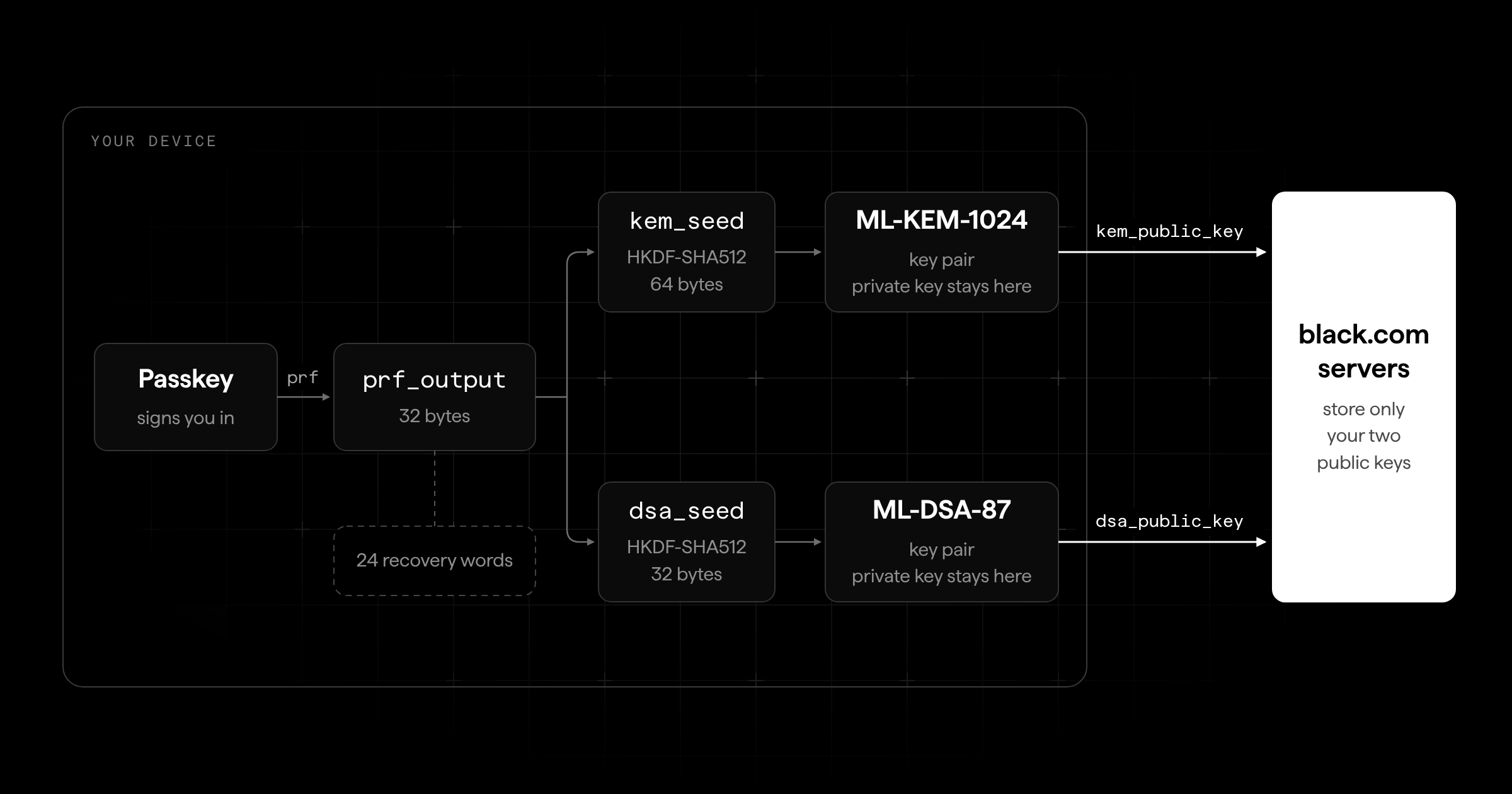
Your device turns prf_output into two seeds, one per algorithm, and each seed into a key pair:
kem_seed                          = HKDF-SHA512(prf_output, "ml-kem-1", 64)
dsa_seed                          = HKDF-SHA512(prf_output, "ml-dsa-1", 32)
(kem_public_key, kem_private_key) = ML-KEM-1024.KeyGen(kem_seed)
(dsa_public_key, dsa_private_key) = ML-DSA-87.KeyGen(dsa_seed)
(The quoted strings are HKDF's domain-separation labels, and the numbers are output lengths in bytes.)
The lengths aren't arbitrary. ML-KEM's key generation takes exactly two 32-byte seeds (FIPS 203 calls them d and z), and ML-DSA's takes one (ξ). The seed fully determines the key pair, so your iPhone and Mac compute the same keys without your email keys ever being synced. Nothing to sync, nothing to leak. The trade-off: because your keys come straight from one passkey's PRF output, an account has exactly one passkey, and moving to a new passkey or provider means re-wrapping the key of every email. We explain how that works in the last section.
Your device then sends us kem_public_key and dsa_public_key. That's everything we get: the two keys other people need to encrypt for you and to check your signatures. prf_output, both seeds and both private keys stay on your device.
What Happens If You Lose Your Passkey?
If you lose your passkey, you lose your keys. And your passkey doesn't really belong to you. It lives with Apple, Google and others. Switching providers has gotten easier (Apple added passkey export in iOS 26), but whether the PRF secret comes along for the ride is up to each provider. We didn't want your mailbox to depend on that.
Tim Cappalli, one of the editors of the WebAuthn spec, puts the risk bluntly: using a sign-in credential for encryption makes the "blast radius" of losing it "immeasurably larger." He's right. That's exactly why we built a second way in.
So every account comes with a 24-word recovery phrase. It encodes exactly the 32 bytes your passkey produces at sign-in (prf_output), and nothing else: a written-down copy of the seed all your keys come from. It is crucial that you write it down once and keep it somewhere safe, so that you can re-derive the same key pairs without your passkey or its provider. Treat it like the key to your mailbox: whoever has it can read everything in it.
There's also a second, simpler way back in: SMS recovery. If you lose your passkey and your 24 words, we can send a code to your phone number and you set up a new passkey. That gets you back into your account. It doesn't get you back into your old emails, because those are encrypted for keys that came from your old passkey. Only the old passkey or your 24 words can open them. We can help you get back in. We can't help you read what you had.
That trade-off is deliberate. Hardcore privacy people will say a phone number has no place near an encrypted inbox, and we understand why. But for most people, being locked out of their account forever is the far bigger risk. And someone who gets hold of your phone number still can't open a single old email.
What Happens If Your Phone Is Lost or Taken?
No encryption helps if someone forces you to unlock your phone. xkcd made that point in 2009 with a $5 wrench.
Short of that, it depends on the state your phone is in. Our apps keep your seed in the iPhone Keychain or the Android Keystore, protected by your phone's hardware. After a restart, nobody can read it until you unlock the phone once. After that, it stays available until the next restart, and that's the state forensic tools like Cellebrite and GrayKey try to break into over a cable. If your phone is unlocked, whoever holds it can simply open the app. In the browser, only your computer's login protects the seed, one more reason we recommend the apps.
Three things help. On iPhone, long-press the black.com app and choose "Require Face ID" (on Android, use Private space or your phone's app lock). Restart your phone if it might be taken. And if it's gone, sign it out under Settings > Active Sessions: the app deletes your keys the next time it goes online.
Why Use Passkeys Instead of Passwords for Encryption?
A password-derived key would work too. Until v2, that's what we used, and most encrypted email providers still do. That being said, we moved away from it for two reasons in particular:
- A password-derived key is only as strong as the password.
In a password-based design, your private key is stored on the server, encrypted with a key derived from your password, so you can fetch it on a new device. If that encrypted blob ever leaks, an attacker can guess passwords against it offline, as fast as their hardware allows. A slow hash like Argon2id raises the cost per guess but it doesn't stop the guessing. A PRF output is 256 bits from a secret that never existed on our servers. There is nothing to guess. - Passwords get lost.
With zero-access encryption, a forgotten password means a locked mailbox. (Passkeys can get lost too. That's why you'll have your 24 words.)
A quick word for everyone who was with us before v2 (thank you, by the way). Your old mail comes along, but it has to move from your old v1 keys to your new ones. That move happens once, on our servers. When you set up your passkey, your app hands over your old v1 RSA private key. A server job then opens every draft, email and attachment, locks it again with AES-256-GCM, wraps its key for your new ML-KEM-1024 public key, and deletes your v1 key when it's done.
How Is an Email Encrypted When You Send It to Gmail?
Mail between providers travels over SMTP, and the provider at the other end has to be able to read what arrives. Therefore, an email to Gmail stays encrypted until you hit send, and an email from Gmail gets encrypted the moment it reaches us. Only in that short window in between, while SMTP hands the email over, can our mail servers and Gmail's read it.
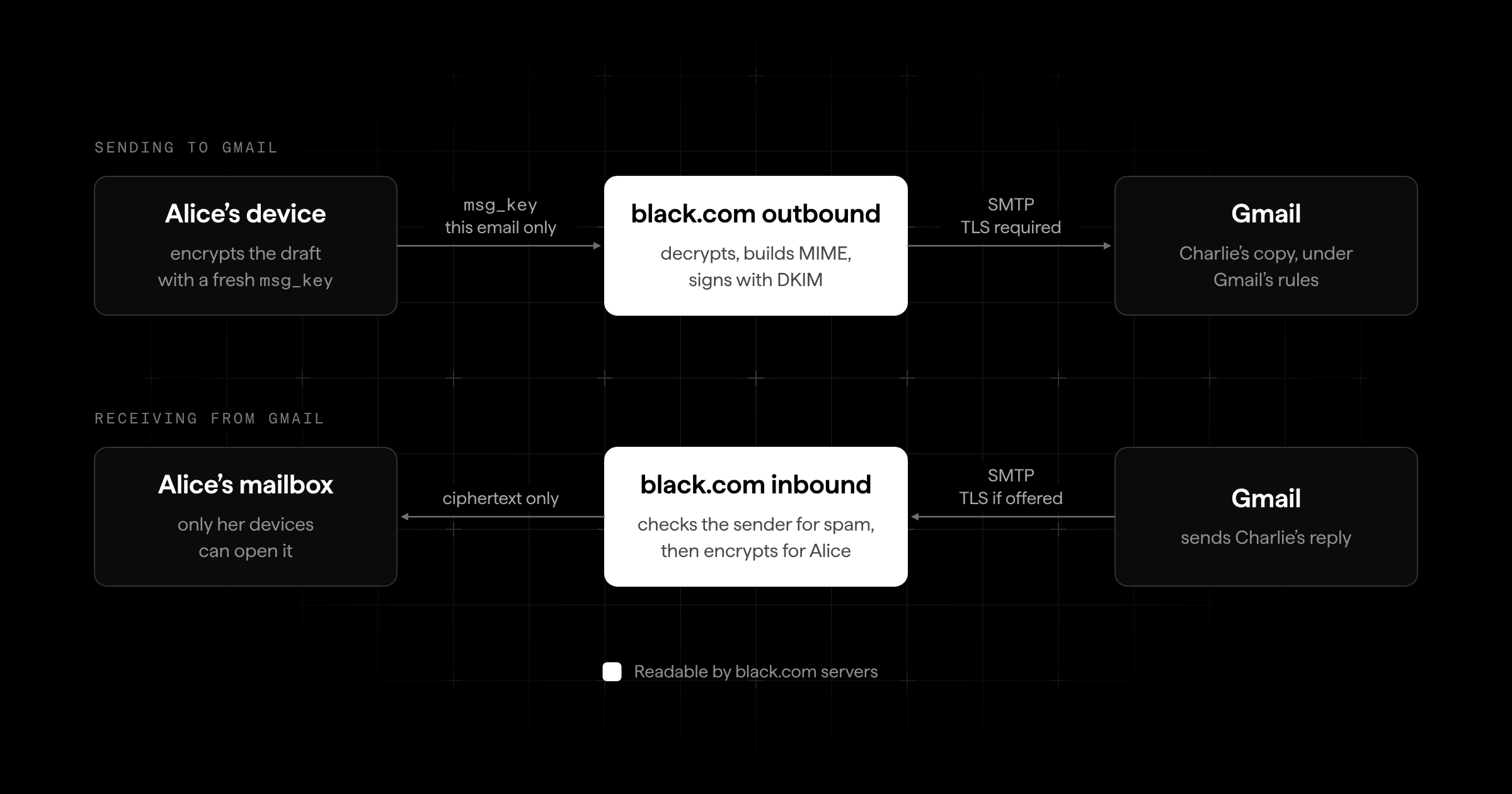
What Happens When You Hit Send?
Say Alice (alice@black.com) writes to Charlie (charlie@gmail.com).
- While Alice types, her app encrypts the draft with a fresh, random
msg_key(AES-256-GCM) and stores it with us, withmsg_keywrapped for her ownkem_public_key_alice. Every autosave is ciphertext. We can't read her drafts. - When she hits send, her app hands our outbound mail service
msg_key. Only this one: not her private key, and not the key of any other email. - The outbound service then decrypts the email, turns it into a standard MIME message, signs it with DKIM so Gmail can verify it really comes from us, and delivers it to Gmail's mail server over SMTP. Delivery always uses TLS: if Gmail's server didn't offer encryption, the email wouldn't go out. Like most mail servers today, ours doesn't yet check the receiving server's certificate. That's what MTA-STS and DANE are for, which we cover below.
- Our servers keep
msg_keyonly until our mail server accepts the message (for a scheduled email, until its send time), then delete it. Our mail server keeps the readable message for at most one day while it retries delivery. Alice's Sent copy stays exactly as it was: ciphertext that only she can open.
From here on, Charlie's copy is Gmail's to protect. We can't encrypt someone else's inbox.
What Happens When an Email Arrives from Gmail?
Now Charlie replies.
- Gmail's server connects to ours over SMTP and hands over the email. We use TLS whenever the other side offers it, but we don't require it yet.
- Our inbound service checks it for spam by looking at the sender, not the content: SPF, DKIM and DMARC, public blocklists (Spamhaus sees the connecting server's IP and domain, never the email) and your own blocklist. Nothing reads the body.
- It generates a fresh
msg_key, encrypts the email with AES-256-GCM and wrapsmsg_keyforkem_public_key_alicewith ML-KEM-1024. - The plaintext is discarded. From now on, only Alice's devices can open the email.
Normally, steps 1 to 3 are the only time our systems hold the email in plaintext. (If our mail server can't hand an email over to the app, it keeps the raw message until a retry succeeds, for at most 30 days.) This is what zero-access encryption means: we see the email once and never again.
Filippo Valsorda made the case against this model back in 2020, aimed at Proton: a provider that ingests inbound mail in plaintext shouldn't simply call that end-to-end encryption. The critique applies to every zero-access provider, including us. That's why we only use the term for mail between black.com users.
Why Can't SMTP Be End-to-End Encrypted?
SMTP is probably older than you. RFC 821 defined it in August 1982, back when the internet was just a few hundred university and research machines whose admins all more or less knew each other. Back then, nobody was worried about strangers reading the mail. So SMTP does one job: it carries a message from one server to the next, like a postal worker handing a postcard down the line. It has no idea what a public key is.
Encryption for the connection itself arrived 17 years later, with STARTTLS (RFC 2487, 1999, today RFC 3207). It encrypts each hop between two servers, but every server along the way still gets the full message. STARTTLS is polite to a fault. When one server offers encryption, and the other side doesn't take the offer, both shrug and carry on in plaintext. An attacker between them only has to delete that one offer. A 2015 study of Gmail's traffic found seven countries where more than 20% of inbound Gmail messages arrived in cleartext because of network attackers. MTA-STS (2018) and DANE (2015) close that downgrade. We don't use either yet. And neither changes the fact that the servers can read the mail.
(And it's not always an attacker. In 2015, Hanno Böck noticed Cisco advertising STARTTLS stripping as a security feature.)
End-to-end encryption needs something at the other end: a public key we can look up, and software that can decrypt with it. For charlie@gmail.com, neither exists. There is no key for Charlie we could find, and his inbox couldn't open an ML-KEM ciphertext if we sent one.
PGP and S/MIME have tried to bolt this onto email since the 1990s. However, they only work when both sides set them up, and almost nobody does. In 2015, PGP's own inventor, Phil Zimmermann, told a researcher he couldn't decrypt an encrypted message because he didn't "have a version of PGP that runs on any of my devices." As he told Motherboard: "The irony is not lost on me." OpenPGP even got post-quantum algorithms in June 2026 (RFC 9980), but they only help if Charlie has a post-quantum key. He doesn't.
Believe us, if we could fix SMTP from our side, we would have done it by now. But it's the language every mail server on Earth speaks. Changing it means getting Gmail, Outlook and millions of other servers to change at the same time. Nobody gets to do that alone. So we do the next best thing: we keep that readable moment as short as we possibly can, and only on the one hop where SMTP leaves us no choice.
If you take anything with you from this article, it should be this: end-to-end encryption needs two ends. We can only build ours.
That's why black.com has a free plan. Price should never be the reason the other end is missing.
Which Parts of an Email Can't Be Encrypted over SMTP?
For mail to and from other providers, once it is stored with us:
- Encrypted with your keys: your drafts, and the subject, body and attachments of every email.
- Readable to our servers, because SMTP needs it: sender and recipient addresses (SMTP routes by the envelope,
MAIL FROMandRCPT TO), plus when each email arrived and how big it is. - Readable while crossing the SMTP hop: the whole message, as described above.
- Out of our hands: the copy at the other provider. Charlie's Gmail inbox follows Gmail's rules, not ours.
How Does End-to-End Encrypted Email Work between black.com Users?
When Alice writes to Bob (bob@black.com), nothing ever has to be decrypted on our side. Her app encrypts and signs the email for Bob before it leaves her device, and only Bob's devices can open it.
- Alice's app fetches Bob's public keys,
kem_public_key_bobanddsa_public_key_bob, from our key directory. - It generates a fresh, random
msg_keyand encrypts each field of the email (subject, body, attachments) with AES-256-GCM, each with its own fresh 12-byte nonce. - It wraps
msg_keytwice with ML-KEM-1024: once for Bob (msg_key_bob) and once for Alice herself (msg_key_alice), that way the email shows up in her Sent folder. - It signs the encrypted email and the wrapped keys with
dsa_private_key_alice(ML-DSA-87). - Our servers store and deliver the ciphertext, the wrapped keys and the signature. None of it is readable to us: we hold no key that opens it.
- Bob's app verifies Alice's signature with
dsa_public_key_alice, unwrapsmsg_key_bobwithkem_private_key_boband decrypts.
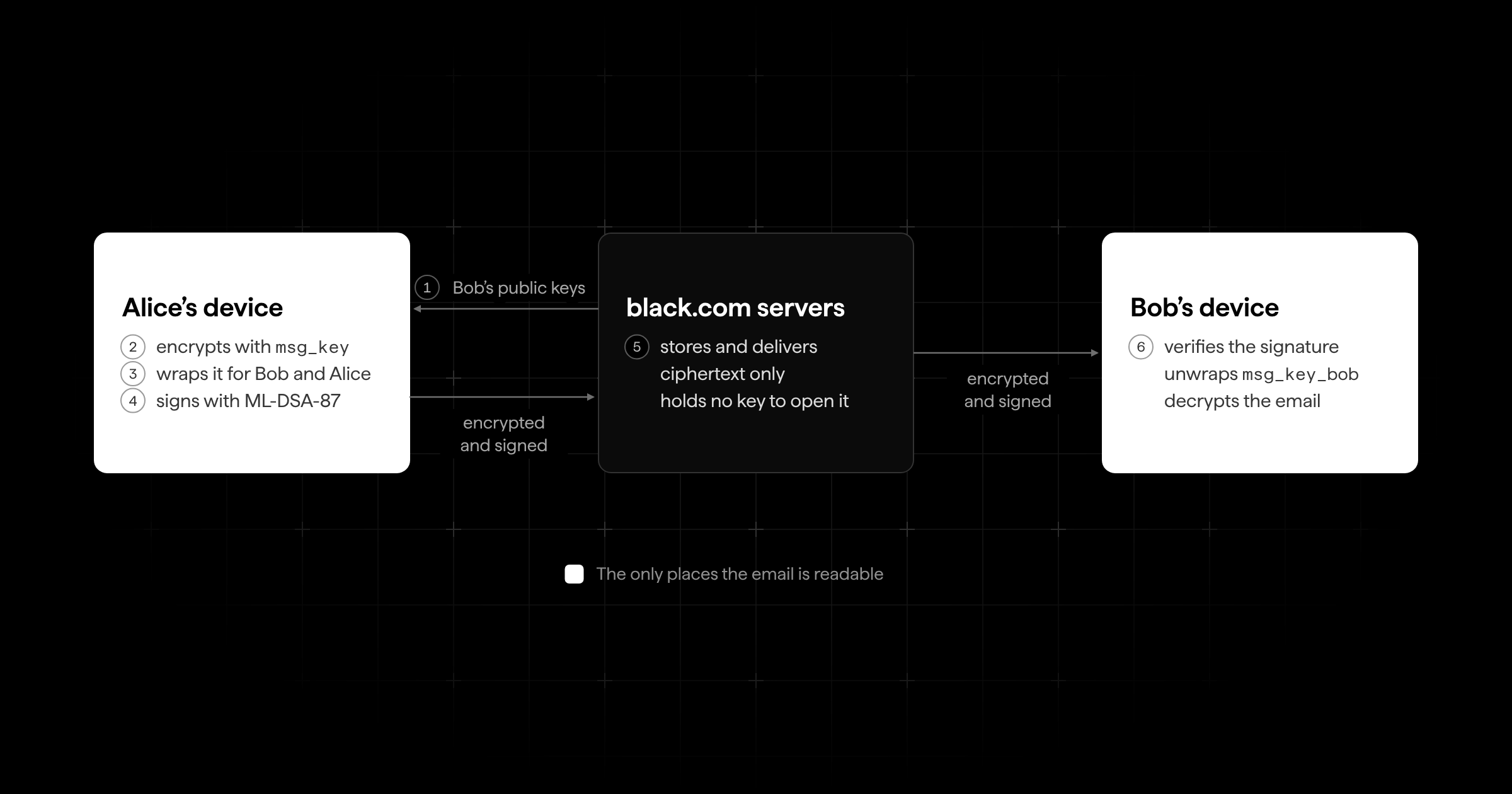
Compare that to the Gmail case and one step is gone: no app ever hands us a msg_key. That one missing step is the difference between zero-access and end-to-end encryption.
And when Bob writes back, the same thing happens the other way around. His reply is locked for Alice before it reaches us. We just pass it along. Not even for a second do we see what's inside.
The signature matters as much as the encryption. It proves the email really comes from Alice's keys, and that nobody (us included) changed a single byte on the way.
In step 1, Alice's app trusts that kem_public_key_bob really belongs to Bob. A compromised server could hand out a key of its own instead. (The same goes for Bob, who checks Alice's signature with a public key he also got from us.) We'll come back to how we're closing that gap at the end of this article.
Which Email Metadata Can't Be Encrypted?
Encryption hides what you write. It doesn't hide that you wrote. Even between two black.com users, our servers need a few things to deliver mail:
- Who writes to whom. We have to know whose mailbox a message goes into.
- When, and how big. Every server knows when it received something and how many bytes it was.
- Your IP address when you connect. Every server you talk to sees it.
- Your public keys. These are public by design. That's what makes encrypting for you possible.
Your content is encrypted end-to-end: the subject, the body and every attachment. (With PGP, the subject line traditionally travels in plaintext. Not here.) Your folder and label names are still stored in plaintext today; encrypting them is coming soon. The metadata listed above stays readable to us.
Side by side, this is what our servers can read:
| What our servers can read | black.com to black.com | To or from other providers |
|---|---|---|
| Body and attachments | Never | Only while crossing SMTP |
| Subject | Never | Only while crossing SMTP |
| Sender and recipient addresses | Yes | Yes |
| Time and size | Yes | Yes |
| Your IP address when you connect | Yes | Yes |
Which Encryption Algorithms Does black.com Use?
Three algorithms do the heavy lifting: ML-KEM-1024 shares the keys, AES-256-GCM locks the content itself, and ML-DSA-87 signs every email. If you are wondering why we picked these and not something else, this is the part for you. At the end, we put all three together in one real example.
What Are ML-KEM-1024 and ML-DSA-87?
Both have been NIST standards since August 13, 2024: ML-KEM in FIPS 203, ML-DSA in FIPS 204. They grew out of CRYSTALS-Kyber and CRYSTALS-Dilithium, two winners of a public competition NIST started back in 2016, where cryptographers around the world spent years trying to break every entry. Both rest on module lattice problems, and so far nobody, with or without a quantum computer, has found an efficient way to solve them.
- ML-KEM is a key encapsulation mechanism. Anyone with your
kem_public_keycan create a fresh 32-byte shared secret, plus a ciphertext that only yourkem_private_keycan turn back into that same secret. We use the secret to wrap message keys. - ML-DSA is a signature scheme. Your
dsa_private_keysigns, and anyone with yourdsa_public_keycan verify. Every email you send to another black.com user is signed with it.
Each comes in three sizes. We use the largest:
| Parameter set | Public key | Private key | Ciphertext or signature | NIST category |
|---|---|---|---|---|
| ML-KEM-1024 | 1,568 bytes | 64-byte seed (3,168 bytes expanded) | 1,568 bytes | 5 |
| ML-DSA-87 | 2,592 bytes | 32-byte seed (4,896 bytes expanded) | 4,627 bytes | 5 |
Category 5 means breaking the scheme should take at least as much effort as a brute-force search for an AES-256 key. It's the highest category NIST defines, and it's the same choice the NSA made for its CNSA 2.0 suite, which requires ML-KEM-1024, ML-DSA-87 and AES-256.
So why not the smaller ML-KEM-768, the size Chrome and Firefox use for TLS? Because an email isn't a website visit. Going up a size costs 384 extra bytes per public key and 480 per ciphertext. When you open a website, every extra byte makes the page a tiny bit slower, millions of times a day. An email doesn't care about a few hundred bytes. What it does care about is time: it sits in your mailbox for years, and that's what "harvest now, decrypt later" attackers are counting on. These hackers collect today and crack whenever they have access to enough quantum compute. That is why we'd rather spend those bytes on extra margin.
We're in good company with that question. In 2024, Daniel J. Bernstein, who designed X25519, wondered why Google saw Kyber-768 as low-risk enough not to move up to Kyber-1024, for a "384 bytes larger key, 480 bytes larger ciphertext."
Why not a hybrid with X25519, the way TLS and the new OpenPGP standard do it? To keep it simple. We use ML-KEM-1024 on its own, with no classical half. Every extra layer is more code, more formats and more room for mistakes, and ML-KEM-1024 is the same choice CNSA 2.0 makes.
Serious cryptographers land on both sides of this question, and we believe that's healthy for a young standard. Cryptographer JP Aumasson summed it up in August 2026: hybrid is "what's getting deployed and recommended in most official guidelines," and "those who'll choose nonhybrid will have their reasons not necessarily unwise."
Why Is AES-256-GCM the Gold Standard for Symmetric Encryption?
ML-KEM doesn't encrypt data at all. It produces shared secrets, and we use those to protect one 32-byte msg_key per email. The email itself is encrypted with AES-256-GCM.
- AES (FIPS 197, 2001) is the most analyzed block cipher in existence, and every modern phone and laptop has hardware instructions for it. We use it with 256-bit keys.
- GCM (NIST SP 800-38D) turns it into authenticated encryption. Besides keeping the content secret, it attaches a 16-byte tag that detects any change. Flip a single bit and decryption fails.
- Against quantum computers, Grover's algorithm at best halves the effective key length. AES-256 keeps around 128 bits of security, which is still far out of reach.
GCM does have one well-known weak spot. A nonce is a number that may only ever be used once with the same key (hence the name). If it is used twice, GCM breaks badly. We made sure that can't happen by design:
- Every email gets its own
msg_key - Every encryption a fresh random nonce
- Every wrap a fresh ML-KEM shared secret.
No key ever protects more than one email, so there is nothing to reuse.
"Gold standard" doesn't mean flawless. As Filippo Valsorda points out, GCM also doesn't commit to its key, so a ciphertext can in principle be crafted to decrypt under two different keys. That's a limit GCM doesn't solve on its own.
What Does an End-to-End Encrypted Email Look Like, Step by Step?
Here is the whole flow in one place, the way our apps do it today. Names ending in _alice or _bob say whose key it is. The ML-KEM shared secret is already a uniformly random 32-byte value, so we use it directly as the AES-256 key that wraps msg_key.
On Alice's device:
# 1. Encrypt every field of email e1 (subject, body, attachments)
msg_key          = random(32)
for each field:
    nonce        = random(12)
    ciphertext   = AES-256-GCM.Encrypt(msg_key, nonce, field)

# 2. Wrap msg_key for Bob
shared_secret_bob, kem_ciphertext_bob = ML-KEM-1024.Encaps(kem_public_key_bob)
nonce_bob        = random(12)
msg_key_bob      = AES-256-GCM.Encrypt(shared_secret_bob, nonce_bob, msg_key)

# 3. Same for Alice's own copy in Sent
#    (kem_public_key_alice -> kem_ciphertext_alice, nonce_alice, msg_key_alice)

# 4. Sign the encrypted email and Bob's wrapped key
signature_alice  = ML-DSA-87.Sign(dsa_private_key_alice,
                     ciphertext || kem_ciphertext_bob || nonce_bob || msg_key_bob)
On Bob's device:
# 1. Check Alice's signature first, stop if it fails
ML-DSA-87.Verify(dsa_public_key_alice,
                 ciphertext || kem_ciphertext_bob || nonce_bob || msg_key_bob,
                 signature_alice)

# 2. Unwrap msg_key, then decrypt each field
shared_secret_bob = ML-KEM-1024.Decaps(kem_private_key_bob, kem_ciphertext_bob)
msg_key           = AES-256-GCM.Decrypt(shared_secret_bob, nonce_bob, msg_key_bob)
field             = AES-256-GCM.Decrypt(msg_key, nonce, ciphertext)
What we store for this email, on top of the encrypted email itself:
| Part | Size |
|---|---|
nonce and GCM tag, per encrypted field |
28 bytes |
Wrap for Bob (kem_ciphertext_bob, nonce_bob, msg_key_bob) |
1,628 bytes |
| Wrap for Alice (same layout) | 1,628 bytes |
signature_alice (ML-DSA-87) |
4,627 bytes |
| Total for a one-field email to Bob | 7,911 bytes |
About 8 KB per email, plus 28 bytes for each extra field and 1,628 bytes for every additional recipient. That's the real price of post-quantum encryption. Not speed, just a few kilobytes.
How Does Search Work in an End-to-End Encrypted Inbox?
Search runs in your app on your own device (web, iOS or Android), not on our servers. Your search terms never reach us. It sounds simple, but it is one of the hardest problems we have worked on.
Gmail can quickly search on its servers because it can read your mail. We can't, by design. That leaves three options:
- Search on the server, over encrypted data.
Searchable encryption lets a server match encrypted queries against an encrypted index. The problem here is leakage: the server learns which emails match which query, and how often. In realistic settings, that's enough to recover queries and even content, as Cash, Grubbs, Perry and Ristenpart showed in 2015. And a server often knows more than you'd think. If a million people receive the same newsletter, its words are no secret, and they make a pretty good codebook for decoding the rest. - Heavier cryptography.
Fully homomorphic encryption or private information retrieval can hide even which emails match. For an inbox with tens of thousands of emails, they are still too slow and too expensive. - Search on the device.
Download, decrypt, index locally. The server learns nothing new. The cost lands on your device instead.
Matthew Green, who teaches cryptography at Johns Hopkins, put option 1 best: "The entire field of searchable encryption seems like a contest to see how much information you can leak."
We chose option 3, the same principle Proton uses for its message content search. Our version works differently for the two kinds of mail:
- Mail to and from other providers. When an email arrives or is sent, our servers hold its plaintext for that one SMTP moment anyway. In that moment they turn the subject, body and attachment names into a short list of words, in any language: lowercased, each word only once ("invoice" ten times is stored once), cut to 16 characters ("Datenschutzgrundverordnung" becomes "datenschutzgrund"), single letters dropped, at most 5 KB per email and about 1 KB on average. The list is encrypted with that email's own
msg_keyand stored next to it. After that, we can't read it either. - Mail between black.com users. We never see that plaintext, so there is no list. Your app decrypts the subject first, then the attachment names, then the body, and stops as soon as all your words are found.
- When you search, your app splits your query the same way, downloads up to 5,000 encrypted lists at a time (newest first), decrypts them 50 at a time in parallel and checks whether all your words appear. Parts of words count, so "voice" finds "invoice". It stops after 100 matching conversations, and "Search deeper" keeps going further back.
Does building those word lists leak anything? Not beyond what SMTP already forces on us. The list is made in the same moment our servers see the email anyway, and it's encrypted before it's stored. After that, we can't read it, and we never learn which words you search for.
The trade-offs: because there's no real index, the further back you search, the longer it will take you. You also can't search for exact phrases ("meeting Friday" finds any email with both words). And text beyond the 5 KB limit isn't searchable, and neither is the text inside a PDF.
What's Next for black.com Encryption?
Three things are on our list. One makes your keys portable, one removes the biggest remaining reason to trust us, and one takes end-to-end encryption beyond our own domain.
What Happens When You Rotate Your Passkey?
Today your keys come from one passkey. Switching to a new passkey means a new prf_output, which means new key pairs. And every email in your mailbox has its msg_key wrapped for your old kem_public_key.
So rotation is a bit like moving house with a very large key ring. Your device unwraps each msg_key with the old private key and wraps it again for the new public key. The emails themselves don't change. Only their wraps do.
The math is the easy part. On a single ordinary CPU core, unwrapping and re-wrapping one key takes about a tenth of a millisecond, so even 100,000 emails need only seconds of compute. The bytes are the hard part: 100,000 wraps at 1,628 bytes each add up to about 163 MB that have to come down to your device and go back up. Reliably, and without leaving your mailbox half-migrated if your phone dies at 60%.
How Do You Know a Public Key Really Belongs to Your Contact?
Remember the caveat from earlier: when Alice's app asks for Bob's public key, it trusts our answer. Today, that is one of the places where you still have to trust black.com. We don't think you should have to.
To be precise: before every send, your app fetches each recipient's current public key from our servers and doesn't warn you if it has changed. So for now, you are trusting us to hand out the right keys. Two more things expert readers will check, so we'll say them first. On the web, the encryption code itself is delivered by our servers every time you open the app. And our code isn't open source and hasn't been independently audited yet.
Starting in Q1 2027, our apps will pin keys. The first time your app sees a contact's public key, it remembers it. If our server ever hands out a different key for the same address, your app notices and tells you, instead of quietly encrypting for a key that might not be Bob's.
Pinning is a first step, not the last one. It protects every email after the first one (security people call this trust on first use). The industry's longer-term answer is verifiable key directories, which WhatsApp started rolling out in 2023. The goal is the same either way: you shouldn't have to trust us at all. We're not there yet, and we would rather say so.
Can End-to-End Encryption Work across Email Providers?
Everything in this article stops at our own domain. The moment Alice writes to Gmail, SMTP takes over, and there is no key on the other side we could encrypt for. We spent a whole section on why that can't be fixed from one side.
So we're building something both sides can speak: a way for any two email providers to exchange end-to-end encrypted, signed, post-quantum mail, with the same guarantees two black.com users get today. In other words, a full replacement for SMTP. It doesn't need every mail server on Earth to switch at once, just two providers that both speak it. It's a big claim and we'll back it up soon.
That's our system, as of v2. If you spot a mistake in this article or a weakness in the design, let us know about it: tell us on X at @blackcom. And if there's one part you'd like us to go deeper on (passkeys, ML-KEM or the search index), tell us there too. It might be the next article.
Sources and Further Reading
Passkeys and PRF
- Web Authentication Level 3, W3C Recommendation, August 25, 2026
- Developer's Guide to PRF, Yubico
- Passkeys and WebAuthn PRF for end-to-end encryption, Corbado (support data as of August 2026)
- Implementing FIDO's new passkey-export format, on the Credential Exchange Format
Lost or stolen devices
- Security, xkcd
- Lock or hide an app on iPhone, Apple
Post-quantum and symmetric cryptography
- FIPS 203: ML-KEM and FIPS 204: ML-DSA, NIST, August 13, 2024
- FIPS 197: AES and SP 800-38D: GCM, NIST
- CNSA 2.0 TLS profile, IETF Internet-Draft, July 2026
SMTP and email security
- RFC 821: Simple Mail Transfer Protocol, August 1982
- RFC 2487 (1999) and RFC 3207 (2002): STARTTLS
- RFC 8461: MTA-STS, RFC 7672: DANE for SMTP, RFC 6376: DKIM
- Neither Snow Nor Rain Nor MITM: An Empirical Analysis of Email Delivery Security, Durumeric et al., IMC 2015
- RFC 9980: Post-Quantum Cryptography in OpenPGP, June 2026
- Even the Inventor of PGP Doesn't Use PGP, Motherboard, 2015
Search and key directories
- Leakage-Abuse Attacks Against Searchable Encryption, Cash, Grubbs, Perry and Ristenpart, CCS 2015
- Search message content, Proton support
- Deploying key transparency at WhatsApp, Meta Engineering, April 13, 2023
About us
- Encrypted mail black.com, Privacy Guides forum thread, October 2024
On X
- @moxie on passkey PRF in Confer and on Bitwarden's missing PRF support
- @keygrubb quoting Tim Cappalli on passkeys for encryption
- @FiloSottile on zero-access encryption and on AES-GCM's limits
- @hanno on Cisco's STARTTLS stripping
- @hashbreaker on Kyber-768 vs Kyber-1024
- @veorq on the hybrid debate
- @matthew_d_green on searchable encryption